

Best answer Open your Jira Scrum project, go to Backlog, select Create sprint, and drag or create ready issues in the new sprint. Add estimates, agree on a sprint goal, check the planned scope against team capacity, and then select Start sprint. Jira will ask you to confirm the sprint name, start date, end date, and goal.
What you need before creating a Jira sprint
Before you create a sprint in Jira, confirm these prerequisites:
- A Scrum project or Scrum board. Sprints are a Scrum feature. A Kanban board uses continuous flow instead.
- A visible backlog. Open the Backlog view from the project navigation.
- Permission to manage sprints. In company-managed projects, the relevant Jira permission is Manage sprints. Moving issues may also require permission to schedule and edit issues.
- Ready backlog items. Candidate issues should have a clear description, acceptance criteria, priority, and an estimate where your team uses story points.
- An agreed planning method. Decide whether the Product Owner prepares an unstarted draft sprint before the meeting or the team scopes the sprint live during planning.
If the Create sprint button is missing, jump to the troubleshooting section below.
How to create a sprint in Jira
1. Open the Scrum backlog
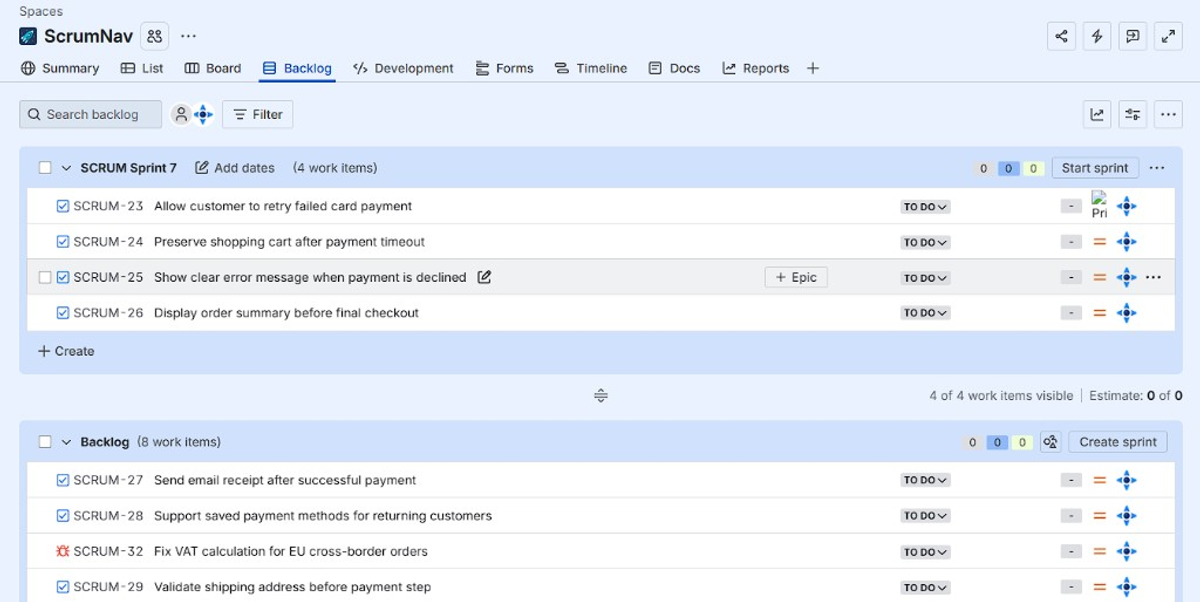
Open the Jira project you use for Scrum and select Backlog in the left navigation.
The backlog contains two related areas:
- Product backlog: prioritized work that is not currently committed to a sprint
- Sprint panel: the work proposed or committed for a specific time-box
Sprint creation and scope planning happen in the Backlog view. The active board is mainly for executing work after the sprint starts.
2. Select Create sprint
Find Create sprint near the backlog section and select it. Jira creates a new unstarted sprint above the product backlog.
That sprint is a planning container, not yet an active commitment. You can create more than one future sprint and reorder them when your team plans ahead.
Official reference: Plan a sprint in Jira.
3. Name and edit the sprint
Give the sprint a clear name, such as:
- Sprint 24 — Checkout reliability
- Mobile onboarding — Sprint 6
- June platform sprint 2
A useful sprint name helps reports, planning discussions, and future searches. Avoid leaving several future sprints with generic names that are difficult to distinguish.
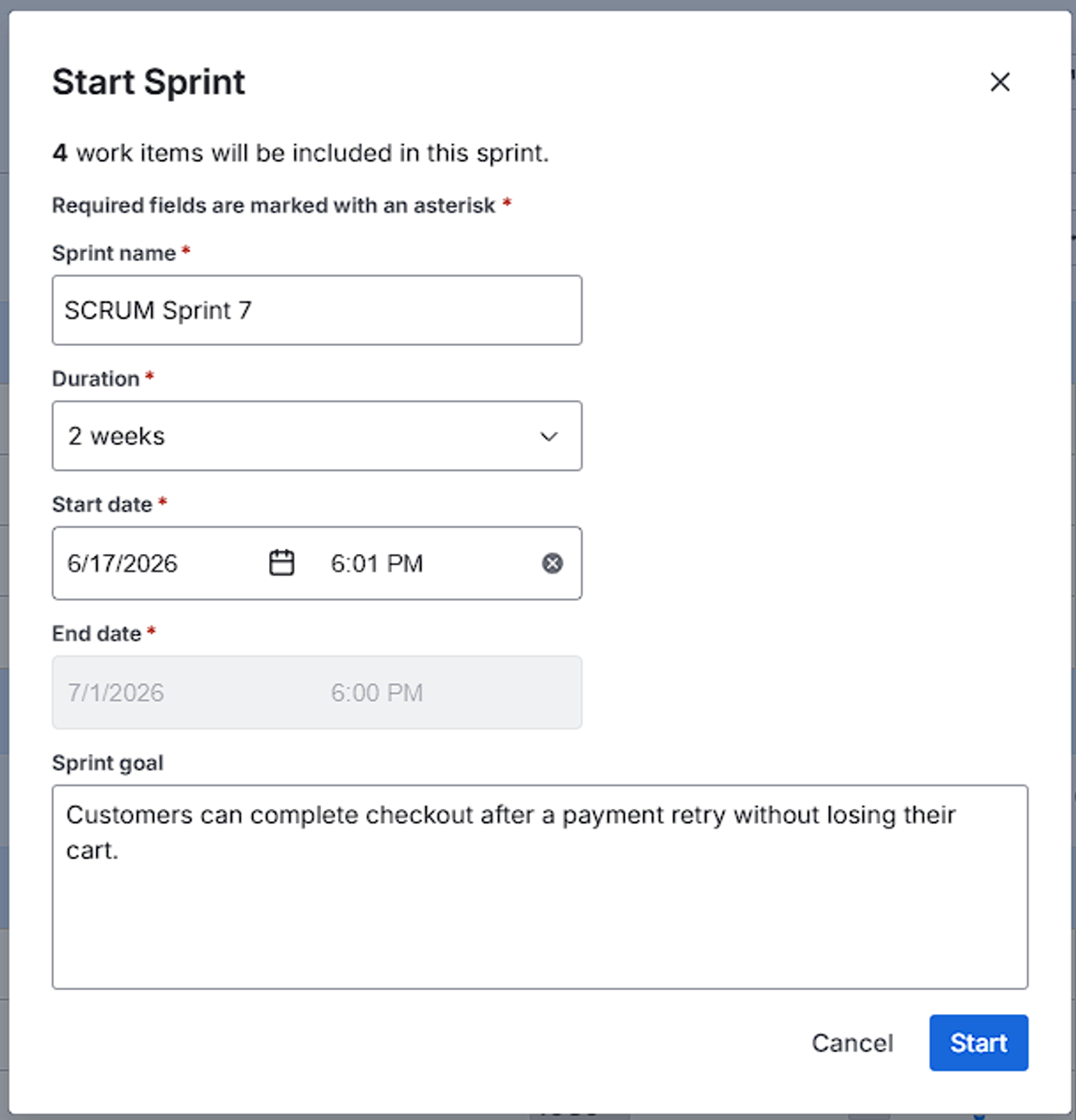
You can also add a sprint goal and planned dates before starting where your Jira configuration supports it. Jira asks you to confirm the actual dates and goal when you start the sprint.
4. Add issues to the sprint
Move ready work from the product backlog into the sprint:
- Drag and drop individual issues into the sprint panel.
- Select multiple issues and move them together.
- Create a new issue directly inside the sprint.
- Edit the Sprint field on an issue when that is faster than dragging.
Order the issues inside the sprint by delivery priority. The top issue should normally be the next most valuable or most important item, not simply the oldest ticket.
5. Estimate the work
Add story points or your team’s chosen estimate before the scope is committed. Unestimated work makes the sprint total look smaller than it really is and increases the risk of over-planning.
Story points describe relative effort, complexity, and uncertainty. They are not a direct conversion to hours. Estimate the issues that are genuine sprint candidates; do not delay the meeting by estimating the entire product backlog.
6. Check scope against team capacity
Compare the planned sprint load with what the team can realistically deliver during this sprint.
Account for:
- holidays and planned absences
- part-time availability
- support or on-call work
- meetings and release activities
- unfinished work carried over from the previous sprint
- uncertainty and unplanned work
Past velocity is a useful reference, but this sprint’s availability should determine the commitment. A team that completed 40 story points last sprint may have less capacity now if people are away or support load is higher.
Many teams leave a small planning buffer instead of filling every theoretical point of capacity. The right buffer depends on how predictable the team’s work is. See velocity vs capacity in Jira and how to handle sprint carry-over.
The standard Jira Scrum backlog shows sprint scope and issue estimates, but it does not show a live team-availability model beside the scope by default. Teams often use a spreadsheet, Advanced Roadmaps, or a Jira app such as ScrumNav to compare planned load with sprint-specific capacity.
7. Agree on the sprint goal
Write one outcome-focused sprint goal that explains why the selected work belongs together.
A strong sprint goal sounds like this:
Customers can complete checkout after a payment retry without losing their cart.
A weak sprint goal sounds like this:
Finish tickets PAY-101 to PAY-118.
Use the goal as a scope filter. When the sprint is too full, remove the lowest-priority work that contributes least to the goal.
Sprint planning using Jira: recommended flow
Using Jira for sprint planning is more than selecting Create sprint. The team still needs to agree what it can deliver and how it will approach the work.
A practical Jira agile sprint planning flow is:
- Review the sprint goal. Confirm the outcome the sprint should achieve.
- Check availability and carry-over. Establish the realistic budget for new work.
- Review ready sprint candidates. Clarify acceptance criteria, dependencies, and delivery order.
- Estimate missing work. Use story points or Scrum Poker for issues that still need an estimate.
- Compare load with capacity. Remove or swap scope until the plan is realistic.
- Confirm ownership and risks. Identify dependencies, blocked work, and specialist constraints.
- Start the sprint. Activate it only after the team agrees on goal, dates, and scope.
Many teams create an unstarted sprint several days before the meeting and place refined candidate issues into it. In that workflow, sprint planning in Jira reviews and trims a draft instead of browsing the entire product backlog during the meeting.
For the full meeting sequence, see how to run sprint planning in Jira, the ScrumNav sprint planning guide, and the sprint planning agenda.
How to start a sprint in Jira
When the team commits to the plan:
- Open Backlog.
- Find the sprint you want to activate.
- Select Start sprint.
- Confirm the sprint name.
- Set the start and end dates.
- Add or confirm the sprint goal.
- Select Start.
After the sprint starts, Jira moves the sprint’s issues to the active Scrum board. The team can then move work through the workflow and track progress with the active sprint, burndown chart, and sprint report.
Do not start a sprint merely to make it visible on the board. Starting changes the sprint from a planning draft into the active time-box and affects sprint reporting.
How to create sprints in Jira for future planning
Jira allows teams to create multiple future sprints in the backlog.
Create the first future sprint, then select Create sprint again. You can name, reorder, and add candidate issues to these unstarted sprints before they become active.
Future sprints are useful for rough planning, but work should not be treated as committed until the team confirms the sprint goal, capacity, dependencies, and scope.
Why can’t I create or start a sprint in Jira?
The Create sprint button is missing
Check these common causes:
- The project uses a Kanban board rather than Scrum.
- The Backlog or Sprints feature is disabled in a team-managed project.
- You are on the active board instead of the Backlog view.
- You do not have permission to manage sprints.
- The board filter includes projects where you lack the required sprint permissions.
Start sprint is disabled
A sprint may need valid start and end dates before it can start. You may also lack permission to set those dates or manage the sprint.
If another sprint is already active, your Jira configuration may require you to complete it first or enable parallel sprints.
Jira starts the wrong sprint
In some company-managed Scrum boards, the sprint you start must be at the top of the backlog. Reorder future sprints so the intended sprint is first.
Issues cannot be moved into the sprint
Creating and managing the sprint does not automatically grant permission to edit or schedule every issue. Check the project permission scheme and the board filter, especially when one board includes work from multiple projects.
Common mistakes when creating sprints in Jira
Starting before the team commits
Keep the sprint unstarted while the scope is still changing. Select Start sprint only after the team agrees on the goal, dates, estimates, and realistic load.
Filling the sprint from the entire backlog
The backlog is a queue of possibilities, not a target to empty. Pull only ready work that supports the sprint goal and fits capacity.
Ignoring unestimated issues
An issue without points is not zero effort. Estimate serious candidates before using the sprint total to make a commitment.
Planning only from historical velocity
Velocity describes what the team completed in previous sprints. It does not know that two developers are on holiday or that a release will consume three days this sprint.
Counting carry-over as free work
Unfinished issues still consume capacity. Account for the remaining effort before adding a full sprint of new scope.
Skipping the sprint goal
Without a goal, the sprint becomes a list of unrelated tickets. A clear goal makes priority decisions easier when scope must change.
Treating Jira as the planning conversation
Jira records the plan. The Scrum Team still needs to discuss value, feasibility, dependencies, and the approach to delivery.
What to do after the sprint starts
During the sprint:
- Keep issue statuses current on the active board.
- Use the sprint goal to guide trade-offs.
- Watch scope changes in the burndown chart and sprint report.
- Avoid adding work without removing equivalent scope or explicitly renegotiating the sprint plan.
- Surface blocked work during the Daily Scrum.
At the end of the sprint, select Complete sprint. Jira asks where unfinished issues should go: the product backlog, an existing future sprint, or a new sprint. Review planned versus completed work before planning the next sprint.
Useful follow-up guides:
Frequently asked questions
- How do you create a sprint in Jira?
- Open a Scrum project’s Backlog, select Create sprint, add ready issues, estimate the work, set a sprint goal, and select Start sprint after the team agrees on scope and dates.
- How do you create multiple sprints in Jira?
- Create one future sprint, then select Create sprint again. Jira lets teams prepare multiple unstarted sprints and reorder them in the backlog.
- Where is the Create sprint button in Jira?
- It is in the Backlog of a Scrum project. If it is missing, check that the board uses Scrum, sprints are enabled, and you have permission to manage sprints.
- Can you create a sprint in a Jira Kanban project?
- Not on a standard Kanban board. Sprints are a Scrum feature. Create or use a Scrum board when the team needs time-boxed sprints.
- How do you add issues to a sprint in Jira?
- Drag issues from the product backlog into the sprint, move several selected issues together, create an issue inside the sprint, or update the issue’s Sprint field.
- When should you start a sprint in Jira?
- Start it when the team agrees on the sprint goal, scope, estimates, dates, capacity, and major dependencies. Keep it unstarted while it is still a planning draft.
- What is the difference between a Jira backlog and a sprint?
- The product backlog contains prioritized work that may be done in the future. A sprint contains the smaller set of work the team forecasts it can complete during a specific time-box.
- How do you run sprint planning in Jira?
- Review the sprint goal, confirm team availability, account for carry-over, examine ready issues, estimate missing work, compare planned load with capacity, resolve dependencies, and start the sprint when the plan is realistic.
- Does Jira have sprint capacity planning?
- Jira tracks sprint scope and issue estimates. Advanced Roadmaps includes capacity features for plans, but the standard Scrum backlog does not show sprint-specific availability and a live load-versus-capacity comparison beside the scope. Teams commonly add a planning process, spreadsheet, or Jira app for that view.
- Can you change a sprint after it starts?
- Jira allows changes to an active sprint when permissions permit, but material scope changes should be visible and agreed by the team because they affect focus and reporting.
- How do you complete a sprint in Jira?
- Open the active sprint and select Complete sprint. Move unfinished issues to the backlog or a future sprint, then review the sprint report before planning the next one.
Try sprint planning with capacity, estimates, and backlog in the interactive demo.