

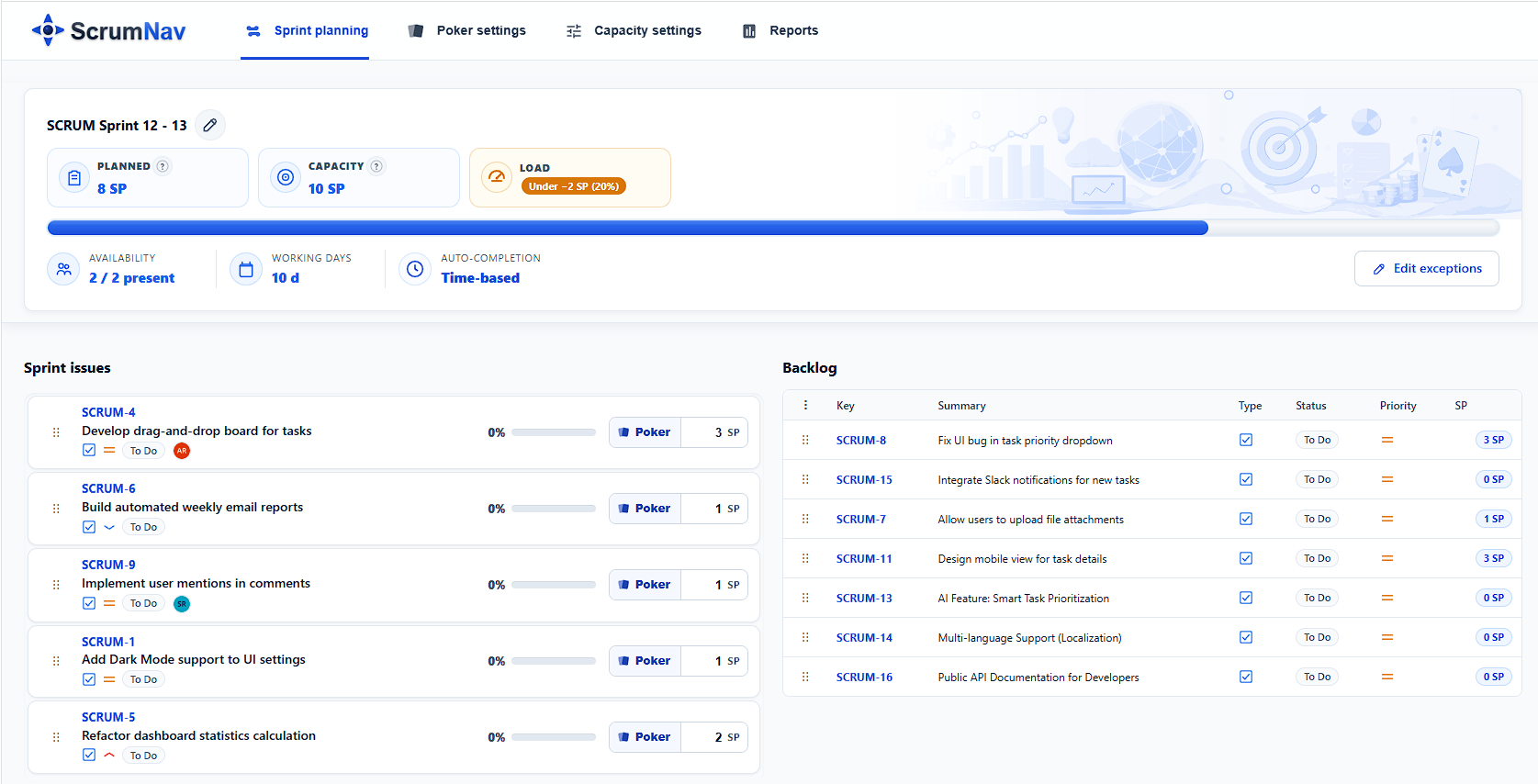
Best answer To run sprint planning in Jira, prepare an unstarted sprint on the Scrum backlog, agree on a Sprint Goal, confirm team availability and carry-over, review ready issues in priority order, estimate missing work, check dependencies, and remove excess scope until the Developers are confident in the Sprint forecast. Select Start sprint only after the team has agreed on the goal and initial plan.
The basic process is:
- Create or open an unstarted sprint.
- Prepare the highest-priority backlog items.
- Agree on the Sprint Goal.
- Confirm team capacity and carry-over.
- Review candidate issues in priority order.
- Estimate missing work and discuss dependencies.
- Trim or swap scope until the plan is realistic.
- Finalize the Sprint Backlog and start the sprint.
Jira records the outcome of Sprint Planning. It does not replace the conversation between the Product Owner, Developers, and Scrum Master.
What is Sprint Planning in Jira?
Sprint Planning is the Scrum event in which the Scrum Team decides why the upcoming Sprint is valuable, what work can realistically be completed, and how the selected work will be approached.
In Jira Software Cloud, most of the planning activity happens on the Scrum backlog. An unstarted sprint acts as a draft container for candidate issues until the team is ready to begin the Sprint.
Sprint Planning formally produces the Sprint Goal, the selected Product Backlog items, and an initial plan for delivering them. A practical planning session should also surface major dependencies, risks, and uncertainties before the Sprint begins.
The Sprint Goal, the Product Backlog items selected for the Sprint, and the initial plan for delivering them together form the Sprint Backlog.
The Developers forecast the work they believe they can complete. The selected issue list is not an unchangeable contract. The Sprint Goal is the commitment for the Sprint Backlog and provides flexibility in the exact work needed to achieve it.
Sprint Planning vs backlog refinement in Jira
Backlog refinement and Sprint Planning both involve Product Backlog items, but they serve different purposes.
| Activity | Purpose in Jira | Typical outcome |
|---|---|---|
| Backlog refinement | Prepare future work for possible selection | Clearer issues, acceptance criteria, estimates and understood dependencies |
| Sprint Planning | Decide what is realistic for the next Sprint | Sprint Goal, selected issues and an initial delivery plan |
| Starting the sprint | Begin the Jira Sprint and activate reporting | Active sprint, confirmed dates and visible Sprint Goal |
Backlog refinement should happen continuously during the Sprint. Sprint Planning should not be the first time Developers see or discuss every candidate issue.
When Sprint Planning becomes a long session for rewriting vague tickets, resolving basic requirements and estimating the entire backlog, the team probably needs stronger refinement before the meeting.
What should be ready before Sprint Planning?
Good Sprint Planning starts before the meeting.
The Product Owner does not need to create a final Sprint Backlog in advance, but the highest-priority candidates should be prepared well enough for the Developers to evaluate them.
Before Sprint Planning:
- create or open an unstarted sprint on the Jira backlog
- order the Product Backlog by priority
- identify the most likely Sprint candidates
- clarify acceptance criteria and expected outcomes
- identify important dependencies
- estimate likely candidates when the team uses estimates
- check unfinished work from the previous Sprint
- confirm holidays, part-time availability and support responsibilities
- prepare a proposed Sprint Goal for discussion
Placing likely candidates into a draft sprint before the meeting can save time. However, the draft sprint is only a proposal. The Developers still decide how much work they believe is realistic.
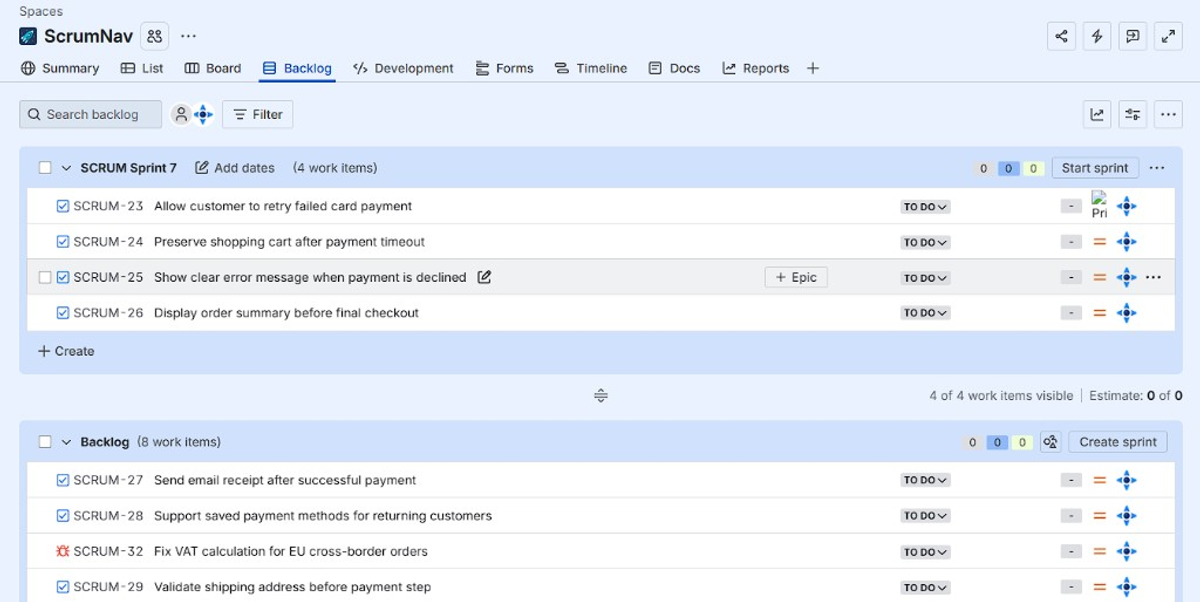
How to run Sprint Planning in Jira step by step
Scrum terminology and Jira state are slightly different. In Scrum, Sprint Planning initiates the Sprint. In Jira, selecting Start sprint activates the Sprint on the board and begins Sprint reporting. Teams therefore normally complete the planning conversation before activating the Sprint in Jira.
1. Open or create an unstarted sprint
Open your Jira Scrum space (project) and select Backlog. Locate the next unstarted sprint.
If a draft sprint does not exist yet, create one and give it a clear working name. The sprint should remain unstarted while the team discusses the goal, capacity and scope.
Add the highest-priority refined issues as initial candidates. Avoid filling the sprint with every item that might possibly be worked on.
The purpose of the draft sprint is to give the team a focused starting point.
At this stage, ask:
- Are these the highest-value ready issues?
- Are important defects or operational commitments included?
- Are there issues that clearly do not belong in this Sprint?
- Is unfinished work from the previous Sprint visible?
Do not select Start sprint yet.
2. Agree on the Sprint Goal
Before discussing individual tickets in detail, agree on why the Sprint is valuable.
A useful Sprint Goal describes an outcome, not a list of issue keys.
Weak Sprint Goal:
Complete PROJ-123, PROJ-141, PROJ-155 and PROJ-162.
Stronger Sprint Goal:
Customers can retry a failed payment without losing the contents of their shopping cart.
The stronger goal explains why the selected work belongs together. It also helps the team make trade-offs when the proposed Sprint contains too much work.
The Product Owner can bring a suggested Sprint Goal, but the final goal should emerge through discussion with the whole Scrum Team.
When reviewing the goal, ask:
- What customer or business outcome are we trying to achieve?
- Can the team explain the goal in one or two sentences?
- Do the highest-priority issues support the goal?
- Would the goal still be meaningful if one lower-priority issue were removed?
Add the agreed goal to Jira when starting the sprint.
3. Confirm team capacity and carry-over
Next, establish how much work the team can realistically take on.
Historical velocity can provide context, but it does not represent current availability. A team that completed 40 story points in recent Sprints may not have the same capacity when someone is on holiday, a production release requires support, or several team members are working part-time.
Review:
- holidays and planned absences
- part-time schedules
- public holidays
- support or on-call responsibilities
- training and company events
- major meetings or workshops
- known production or release work
- unfinished work from the previous Sprint
Carry-over should be treated as real work. An unfinished issue already inside the next Sprint still consumes capacity, even when some of the work was completed previously.
Account for the remaining load of carry-over work when planning capacity. Do not automatically change the original story-point estimate merely to represent progress. Track the remaining load separately, use a remaining-work estimate, or use a completion percentage according to your team’s planning method.
For example, a 13-point issue that is almost finished should not automatically consume the same planning capacity as a new 13-point issue. The team should discuss what work genuinely remains.
4. Review candidate issues in priority order
Review the selected Jira work items (issues) already placed in the draft sprint, starting with the highest-priority item.
The goal is not to read every Jira field aloud. The discussion should establish whether each issue is understood well enough to include in the Sprint forecast.
For each serious candidate, confirm:
- the expected outcome
- acceptance criteria
- relevant designs or technical information
- external dependencies
- possible blockers
- testing needs
- whether the issue supports the Sprint Goal
- whether the work can reasonably be completed within the Sprint
Developers may identify missing information, unexpected complexity or dependencies that change the plan.
When an issue is not sufficiently understood, the team can:
- clarify it during the meeting
- split it into smaller items
- replace it with a better-prepared issue
- return it to the Product Backlog for further refinement
Sprint Planning should not reward optimism at the expense of clarity.
5. Estimate missing work
If the team uses story points or another estimation method, serious Sprint candidates should have estimates where the team uses estimation.
Unestimated issues represent unknown load. A Sprint may look realistic in Jira while still containing a large amount of invisible work.
During planning:
- estimate missing candidate issues
- update estimates when new information materially changes the work
- split issues that are too large or uncertain
- avoid spending time estimating unrelated future backlog items
- confirm that the estimate represents the team’s shared understanding
Estimation supports the forecast. It should not become the sole basis for deciding whether an issue belongs in the Sprint.
Teams that estimate collaboratively may use Planning Poker or Scrum Poker during this step.
6. Discuss the delivery approach, dependencies and risks
Sprint Planning covers both what can be done and how the selected work may be delivered.
The plan does not need to predict every task or technical decision. It should provide enough shared understanding for the team to begin work confidently.
Discuss:
- which issues should be approached first
- important sequencing between issues
- work involving another team
- external approvals or release dependencies
- testing and deployment needs
- specialist knowledge or single-person dependencies
- technical risks that could threaten the Sprint Goal
- whether large issues should be divided into smaller deliverables
Jira can record dependencies and issue relationships, but the team still needs to discuss their practical impact.
A dependency field is not useful if nobody has agreed who will resolve the dependency or when the required work will be available.
7. Compare planned load with realistic capacity
Once the serious candidates have been reviewed, compare the planned work with the team’s realistic capacity.
Use recent velocity as a reference, not as an automatic quota.
A team should not select 40 points simply because its average velocity is 40. Current availability, carry-over, uncertainty and the nature of the work may justify a lower forecast.
A practical capacity review asks:
- How much work is already carried over?
- Is the planned total realistic given this Sprint’s availability?
- Are several issues unusually uncertain?
- Does the Sprint contain enough buffer for support and unexpected work?
- Is too much work dependent on one person?
- Can the Sprint Goal still be achieved if a lower-priority issue is removed?
Many teams plan below their theoretical maximum. A Sprint filled to 100% of calculated capacity leaves little room for meetings, support, defects, coordination and discovery.
8. Trim or swap excess scope
If the proposed Sprint is too large, remove or replace work before starting it.
Start with the lowest-priority issues that contribute least to the Sprint Goal.
Possible actions include:
- removing a lower-priority issue
- replacing a large issue with a smaller ready item
- splitting an issue and selecting only the valuable first part
- returning an unclear item to refinement
- reducing optional work that is not necessary for the Sprint Goal
- keeping additional ready items at the top of the Product Backlog
Do not solve excess scope by assuming the team will work faster.
The purpose of Sprint Planning is to create a credible forecast, not to maximize the number of points displayed in the Sprint.
9. Perform a final Sprint check
Before starting the sprint, pause for a final review.
Confirm that:
- the Sprint Goal is clear
- the selected issues support the goal
- the Developers understand the work
- serious candidates have estimates where the team uses estimation
- important dependencies are understood
- carry-over has been included in the load
- the plan reflects actual team availability
- the total scope is realistic
- no one is relying on hidden overtime
- the team is comfortable beginning the Sprint
This is also the right time to remove accidental issues, confirm ownership of immediate follow-up actions and check that required Jira fields are complete.
10. Start the sprint in Jira
Select Start sprint only after the team has agreed on the Sprint Goal and initial Sprint Backlog.
In Jira Software Cloud:
- Open your Jira Scrum space (project) and select Backlog.
- Locate the unstarted sprint.
- Select Start sprint.
- Confirm the sprint name.
- Confirm the start and end dates.
- Enter or review the Sprint Goal.
- Select Start.
After the sprint starts, the issues appear on the active board and Jira begins collecting Sprint reporting data.
The exact controls may vary slightly depending on the project configuration and Jira interface, but the planning principle remains the same: keep the Sprint unstarted while the plan is still changing.
For Jira mechanics, see how to create a sprint in Jira.
Example: planning a realistic Jira sprint
Consider a team that normally completes approximately 36 story points in a two-week Sprint.
For the upcoming Sprint:
- one Developer is away for three days
- the team expects additional production support
- 5 points of remaining carry-over load
- the draft sprint contains 39 points of new work
Starting the Sprint with all 44 points would ignore the team’s reduced availability and additional support responsibility.
During Sprint Planning, the team:
- agrees on a Sprint Goal focused on improving payment recovery
- confirms that the carry-over issue supports that goal
- removes an unrelated 8-point reporting feature
- splits a 5-point optional improvement from a larger checkout issue
- keeps the smaller improvement at the top of the Product Backlog
- starts the Sprint with a forecast of 31 points
The final number is lower than the team’s historical velocity, but the plan reflects the actual conditions of this Sprint.
That is more useful than treating average velocity as a mandatory target.
Sprint Goal, capacity and velocity
Sprint Goal, capacity and velocity support different planning decisions.
Sprint Goal
The Sprint Goal explains why the Sprint is valuable. It guides scope decisions and creates coherence between the selected issues.
Use it to decide what should remain when the Sprint contains too much work.
Capacity
Capacity describes what the team can realistically deliver in the upcoming Sprint based on current availability and expected load.
Capacity changes from Sprint to Sprint.
Velocity
Velocity describes how much estimated work the team completed in previous Sprints.
Velocity is historical evidence. It can provide a useful range or warning signal, but it cannot see future holidays, support work or unusual uncertainty.
A practical planning principle is:
Use capacity to plan the current Sprint and velocity to challenge whether the result looks plausible.
Do not increase estimates or add low-value issues simply to match a historical velocity number. See Sprint capacity vs velocity and how to plan a realistic sprint.
How long should Sprint Planning take?
Sprint Planning is timeboxed to a maximum of eight hours for a one-month Sprint and is usually shorter for shorter Sprints. For a two-week Sprint, approximately one to three hours is a common practical range, not a Scrum requirement. A team with strong backlog refinement may need less time, while a new team or technically complex Sprint may need more.
The meeting should be long enough to produce a credible plan, but it should not become a substitute for backlog refinement.
A practical sequence is:
- Sprint Goal and product context
- capacity and carry-over
- issue review and estimation
- dependencies and delivery approach
- scope trade-offs
- final check and Start sprint
For suggested timings and a complete meeting structure, see the Jira sprint planning agenda.
Common Sprint Planning mistakes in Jira
Planning from the entire Product Backlog
Browsing hundreds of backlog items during the meeting wastes time and encourages unstructured scope selection.
Prepare a focused draft sprint or a short list of ready candidates before the meeting.
Treating velocity as the Sprint budget
Average velocity does not account for current availability, support load or the specific risks of the next Sprint.
Use it as a reference, not an instruction.
Ignoring carry-over
Unfinished issues consume future capacity. Adding a full new Sprint on top of carried-over work usually creates hidden overload.
Starting the sprint too early
Once the Sprint is active, Jira treats it as started and begins reporting.
Keep it unstarted while the team is still changing the goal, dates, estimates or scope.
Using a ticket list as the Sprint Goal
A list of issue keys does not explain why the Sprint matters and does not help the team make trade-offs.
Write an outcome-focused Sprint Goal.
Including unestimated or unclear work
Unknown work creates unknown load. Clarify, estimate, split or remove serious uncertainties before starting.
Filling every point of theoretical capacity
A perfectly full Sprint has no room for coordination, support, defects or unexpected discoveries.
Leave a realistic buffer.
Treating Jira as the meeting
Jira can display issues, estimates and Sprint data. It cannot make value, feasibility and risk decisions for the Scrum Team.
The plan still requires a conversation.
What Jira supports during Sprint Planning
Jira provides the core structure required to create and start a Scrum Sprint.
Teams can use the backlog to:
- create an unstarted sprint
- organize candidate issues
- reorder work by priority
- view issue estimates
- edit issue details
- record the Sprint Goal
- set Sprint dates
- start the Sprint
- review Sprint reports after work begins
However, the standard Jira backlog does not always provide a complete planning picture in one view. Jira Cloud Premium and Enterprise also include capacity planning in Plans, although this is provided in a separate planning view rather than directly in the standard Sprint backlog.
Teams may still need to calculate or track:
- current team availability
- planned load compared with current capacity
- remaining effort for carry-over
- per-person availability
- planning buffer
- collaborative estimates
- historical planning decisions
This often leads to separate spreadsheets, browser tabs or manual calculations during the meeting.
Jira Sprint Planning checklist
Use this checklist before selecting Start sprint.
Before the meeting
- The Product Backlog is ordered.
- The highest-priority candidates have been refined.
- Acceptance criteria are sufficiently clear.
- Likely dependencies are visible.
- An unstarted sprint has been prepared.
- Carry-over from the previous Sprint is known.
- Team availability has been checked.
- A proposed Sprint Goal is ready for discussion.
During the meeting
- The Scrum Team agrees why the Sprint is valuable.
- The Sprint Goal is clear and outcome-focused.
- Candidate issues are reviewed in priority order.
- Missing estimates are added where the team uses estimation.
- Dependencies and major risks are discussed.
- Carry-over is included in the planned load.
- Planned work is compared with realistic capacity.
- Excess scope is removed or replaced.
- The Developers are comfortable with the forecast.
Before starting the sprint
- Sprint dates are correct.
- The Sprint Goal has been entered.
- The selected issues support the goal.
- The Sprint does not depend on hidden overtime.
- The team understands the immediate delivery approach.
- The Sprint is ready to begin.
Frequently asked questions
- How do you run Sprint Planning in Jira?
- Prepare an unstarted sprint on the Scrum backlog, agree on a Sprint Goal, confirm team capacity and carry-over, review ready issues, estimate missing work, discuss dependencies, trim excess scope and select Start sprint when the Developers are confident in the forecast.
- Where does Sprint Planning happen in Jira?
- The Jira work for Sprint Planning normally happens in the Scrum backlog, where the team prepares an unstarted Sprint and reviews candidate work. The Sprint Planning event itself is a collaborative discussion by the Scrum Team, with Jira used to record and manage the resulting plan.
- Should the sprint be created before Sprint Planning?
- A draft sprint can be created before the meeting and filled with likely candidates. It should remain unstarted until the Scrum Team has agreed on the goal and the Developers have created a realistic forecast.
- Who attends Sprint Planning?
- The whole Scrum Team attends Sprint Planning: the Product Owner, Developers and Scrum Master. Other people may be invited when their advice is needed, but the Scrum Team remains responsible for the plan.
- Who decides how much work goes into the Sprint?
- The Developers select the amount of work they believe they can complete. The Product Owner provides priorities and product context, while the whole Scrum Team collaborates on the Sprint Goal.
- Should the team commit to completing every selected Jira issue?
- The Developers create a forecast based on what is known during Sprint Planning. The Sprint Goal is the commitment for the Sprint Backlog. The selected work is a forecast that can be updated as the team learns more, provided the Sprint Goal is not endangered.
- How long should Sprint Planning take for a two-week Sprint?
- The Scrum Guide does not prescribe a specific duration for a two-week Sprint. One to three hours is a common practical range, depending on team size, refinement quality and complexity.
- What should be ready before Sprint Planning?
- The highest-priority candidates should have a clear purpose, sufficiently understood acceptance criteria, known dependencies and estimates when the team uses them. Team availability and unfinished work should also be known.
- Should you use velocity or capacity in Jira Sprint Planning?
- Use current capacity to decide what is realistic for the upcoming Sprint. Use historical velocity as a sanity check, not as a fixed quota.
- How should carry-over be handled?
- Account for the remaining load of carry-over work when planning capacity. Do not automatically change the original story-point estimate merely to represent progress. Track the remaining load separately, use a remaining-work estimate, or use a completion percentage according to your team’s planning method.
- Does Jira include Sprint capacity planning?
- Jira’s standard Scrum backlog shows Sprint work and estimates, but it does not provide a live team-availability model beside the Sprint scope. Jira Cloud Premium and Enterprise also include capacity planning in Plans, although this is provided in a separate planning view rather than directly in the standard Sprint backlog.
- When should you select Start sprint?
- Start the sprint after the Sprint Goal and initial plan are ready, Jira dates are correct, and any estimates used by the team have been reviewed.
Try sprint planning with capacity, estimates, and backlog in the interactive demo.