

A practical starting point is to leave 5–15% of adjusted capacity as buffer when planning a Jira Sprint.
For many established teams, a 10% buffer is a reasonable initial convention. This means planning approximately 90% of the team’s adjusted Sprint capacity and leaving the rest available for normal uncertainty.
This is not a Scrum rule.
A team with frequent production incidents, external dependencies, unclear work, or high carry-over may need a larger buffer. A stable team with strong refinement and few interruptions may need less.
The basic calculation is:
Planning target = adjusted Sprint capacity × planning percentage
For example, if the team’s adjusted capacity is 40 story points and it plans to 90%, the planning target is 36 points. The remaining four points are intentionally left unallocated.
Best answer
How much Jira Sprint buffer should you leave?
Start with a 5–15% buffer as a planning convention, then calibrate it using your team’s Sprint data:
- Use around 5% when delivery is stable and predictable.
- Start near 10% for normal uncertainty and occasional interruptions.
- Use 15% or more when support work, dependencies, unclear issues, or carry-over are high.
Calculate the team’s capacity after known absences and recurring responsibilities. Apply the buffer to that adjusted capacity, subtract the remaining load of carry-over work, and add new Jira issues until the planned load reaches the target.
Do not create a fake Jira issue to represent the buffer. In most cases, simply stop adding work before the Sprint reaches its full calculated capacity.
What is a Jira Sprint Planning buffer?
A Jira Sprint Planning buffer is the intentional gap between the team’s adjusted Sprint capacity and the amount of work included in the initial Sprint forecast.
It is a planning margin, not a hidden backlog, a separate estimate category, or a placeholder Jira issue.
Sprint capacity
Capacity is your adjusted ability to deliver in the upcoming Sprint after accounting for known availability constraints such as holidays, absences, and planned non-feature commitments.
Planning target
Target is the planned workload you intentionally choose to forecast into the Sprint, calculated from adjusted capacity and planning percentage.
Sprint buffer
Buffer is the difference between adjusted capacity and planned target. It is reserved to absorb uncertainty: defects, support spikes, scope clarification, dependency delays, and normal execution variance.
How much buffer should a Scrum Sprint have?
A practical starting range is 5%–15% below adjusted capacity. The right value depends on uncertainty, support load, carry-over, and recent forecast accuracy.
5% buffer
- Team has strong refinement quality and stable throughput.
- Support and production interrupts are low and predictable.
- Carry-over is consistently low across recent Sprints.
- Forecast error has remained small over multiple Sprint cycles.
10% buffer
- A practical default for mixed uncertainty.
- Simple to explain and apply in capacity calculations.
- Leaves room for normal execution variability.
- A useful starting point before team-specific calibration.
15% buffer
- Frequent support interrupts or urgent bug demand.
- New domain, new team composition, or major dependency risk.
- Carry-over volatility is high and difficult to predict.
- Recent Sprints show repeated over-forecast patterns.
Why not plan to 100%?
Planning to 100% assumes perfect predictability. In practice, Sprint execution includes unknowns that cannot be fully scheduled in advance. A full-capacity plan often creates immediate pressure when even minor deviations occur.
When teams repeatedly plan to 100%, common outcomes include:
- scope churn in the middle of the Sprint
- rushed validation and quality compromises near Sprint end
- higher carry-over to the next Sprint
- lower trust in Sprint forecasts and planning metrics
Buffer is not the same as reduced availability
These are related but different planning controls.
Reduced availability adjusts capacity first
Reduced availability converts nominal capacity into adjusted capacity by reflecting known realities: holidays, absences, support commitments, training, and non-delivery events.
Buffer is the uncertainty margin after adjustment
Buffer is applied on top of adjusted capacity. It protects the forecast from uncertainty that remains even after known commitments are already accounted for.
Include the team’s normal, predictable support allocation in adjusted capacity. Use buffer only for variation above that expected baseline.
What should buffer be used for?
Buffer should be used for uncertainty that is expected in complex delivery but hard to schedule precisely before Sprint start. Predictable support belongs in adjusted capacity; support spikes consume buffer:
- production support spikes and urgent bug work
- dependency delays and integration coordination
- story-level clarification discovered during delivery
- estimation variance and emerging technical complexity
- uncertainty in the remaining effort of partially completed carry-over work
How to calculate Sprint planning target
Use the same formula each Sprint for consistency and auditability.
Planning percentage = 100% − buffer percentage
Planning target = adjusted capacity × planning percentage
Example:
- Buffer = 10%
- Planning percentage = 90%
- Adjusted capacity = 40 SP
- Planning target = 40 × 0.90 = 36 SP
Once you have the planning target, include carry-over remaining load first, then add new work up to target.
| Adjusted capacity | Planning percentage | Planning target | Buffer |
|---|---|---|---|
| 40 SP | 95% | 38 SP | 2 SP |
| 40 SP | 90% | 36 SP | 4 SP |
| 40 SP | 85% | 34 SP | 6 SP |
| 50 SP | 95% | 47.5 SP | 2.5 SP |
| 50 SP | 90% | 45 SP | 5 SP |
| 50 SP | 85% | 42.5 SP | 7.5 SP |
Worked Jira example
Assume the team has adjusted capacity of 42 SP for the Sprint. The team chooses a 90% planning percentage.
Planning target = 42 × 0.90 = 37.8, rounded to 38 SP. Initial draft scope in Jira totals 44 SP including 6 SP of carry-over remaining load and 38 SP of new work.
The team now trims scope before Sprint start: first, they defer a 5 SP optional report improvement that is not required for the Sprint Goal. They then split a 3 SP enhancement and keep only a 2 SP minimum slice in this Sprint.
Updated scope becomes 38 SP: 6 SP of carry-over remaining load and 32 SP of new work.
Whole Jira issues decide the final number. The team stops at complete issues that fit the target rather than attempting to fill fractional story points. The final forecast leaves exactly 4 SP of buffer between the planned load of 38 SP and the adjusted capacity of 42 SP.
Sprint buffer and carry-over
Carry-over and buffer are not interchangeable. Carry-over is real remaining workload from prior Sprint execution and must be included in the forecast before new scope is added.
Recommended sequence: calculate planning target, include carry-over remaining load, then fill with new work until target is reached.
Do not change story points just to show progress
Preserve original story-point estimates for historical consistency. If an item is partially done, do not rewrite original points to match completion percentage. Instead, track remaining load separately and use that remaining load for planning math.
See how to handle sprint carry-over for detailed carry-over handling approaches.
Sprint buffer, capacity, and velocity
Use these three inputs together but for different decisions. Capacity reflects the conditions of the upcoming Sprint. Velocity provides a historical plausibility check. Buffer protects the forecast from normal uncertainty.
Velocity
Velocity is historical evidence. It is useful for directional sanity checks but should not become a mandatory target for a future Sprint with different availability, risks, and dependencies.
Capacity
Capacity is current Sprint ability after known constraints. It is the planning baseline for scope decisions.
Sprint buffer
Buffer is the uncertainty margin between adjusted capacity and target load. It reduces the risk of over-forecasting the Sprint.
A practical six-step sequence:
- Calculate adjusted capacity for the upcoming Sprint.
- Select planning percentage based on uncertainty level.
- Compute planning target.
- Subtract carry-over remaining load.
- Add new work to target and trim if over.
- Compare with recent velocity as a plausibility check only.
For deeper context, see velocity vs capacity in Scrum Sprints.
How to apply in Jira
Use a repeatable Sprint Planning flow so buffer decisions are visible and consistent across Sprints.
- Open the unstarted Sprint in Jira Backlog.
- Confirm adjusted capacity assumptions for this Sprint.
- Choose planning percentage (5%, 10%, or 15%).
- Calculate planning target from adjusted capacity.
- Identify carry-over items and remaining load.
- Count carry-over against planning target first.
- Add new issues in priority order.
- Trim or split lower-value items if planned load exceeds target.
- Validate Sprint Goal coherence after scope changes.
- Select Start sprint once forecast is realistic and agreed.
Jira’s Sprint commitment insight can recommend a target range based on recent Sprint history. In team-managed projects, Atlassian calculates the recommendation from the previous five Sprints. Jira Cloud Premium and Enterprise also provide capacity planning in Plans.
These features provide useful historical or cross-team planning signals, but they do not determine the correct uncertainty buffer for the current Sprint.
The Scrum Team still needs to account for current availability, carry-over, support load, dependencies, and the risk profile of the selected work.
For full mechanics, see how to run sprint planning in Jira, scrum sprint planning agenda, and how to create a sprint in Jira.
Apply with ScrumNav
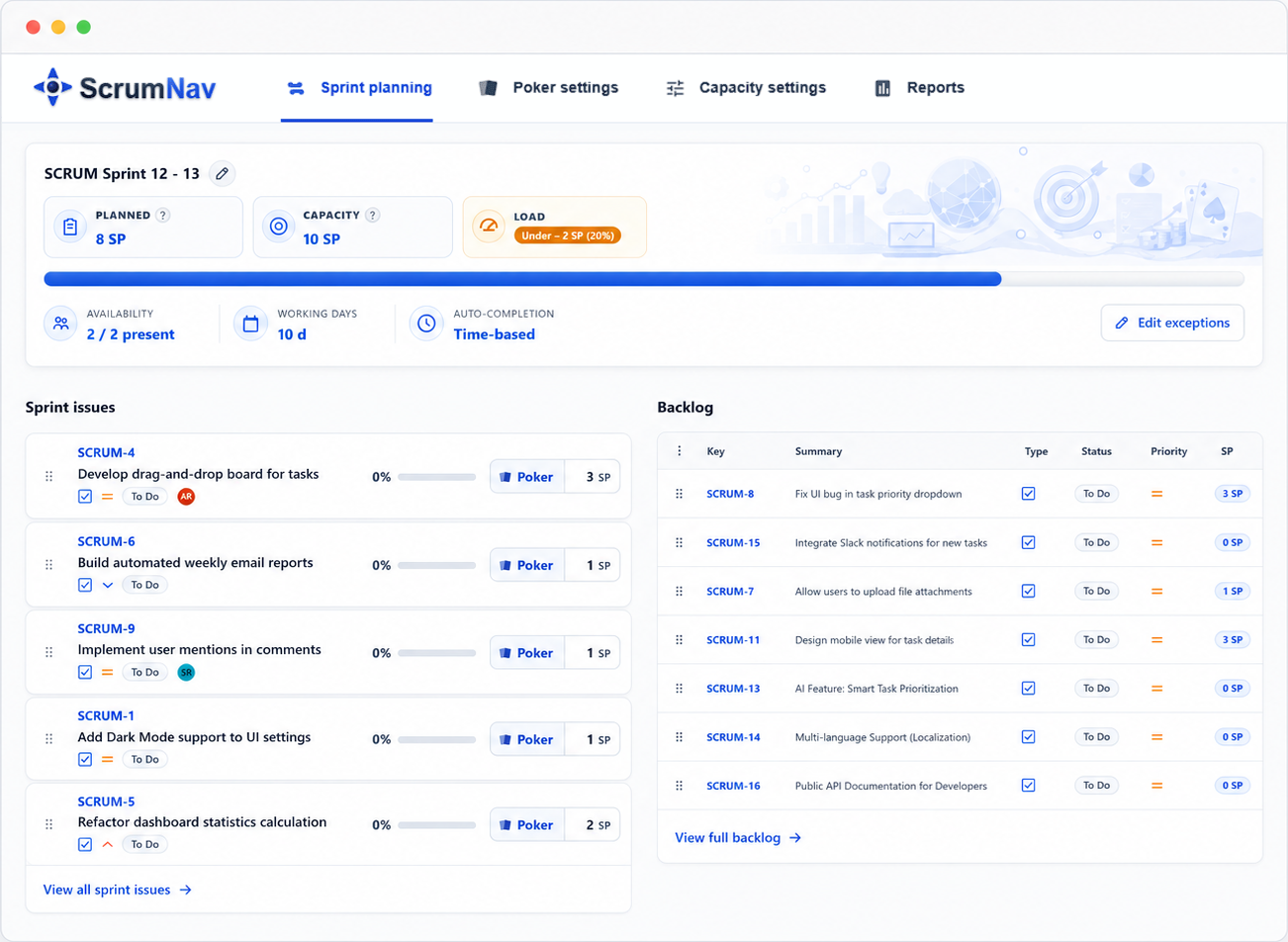
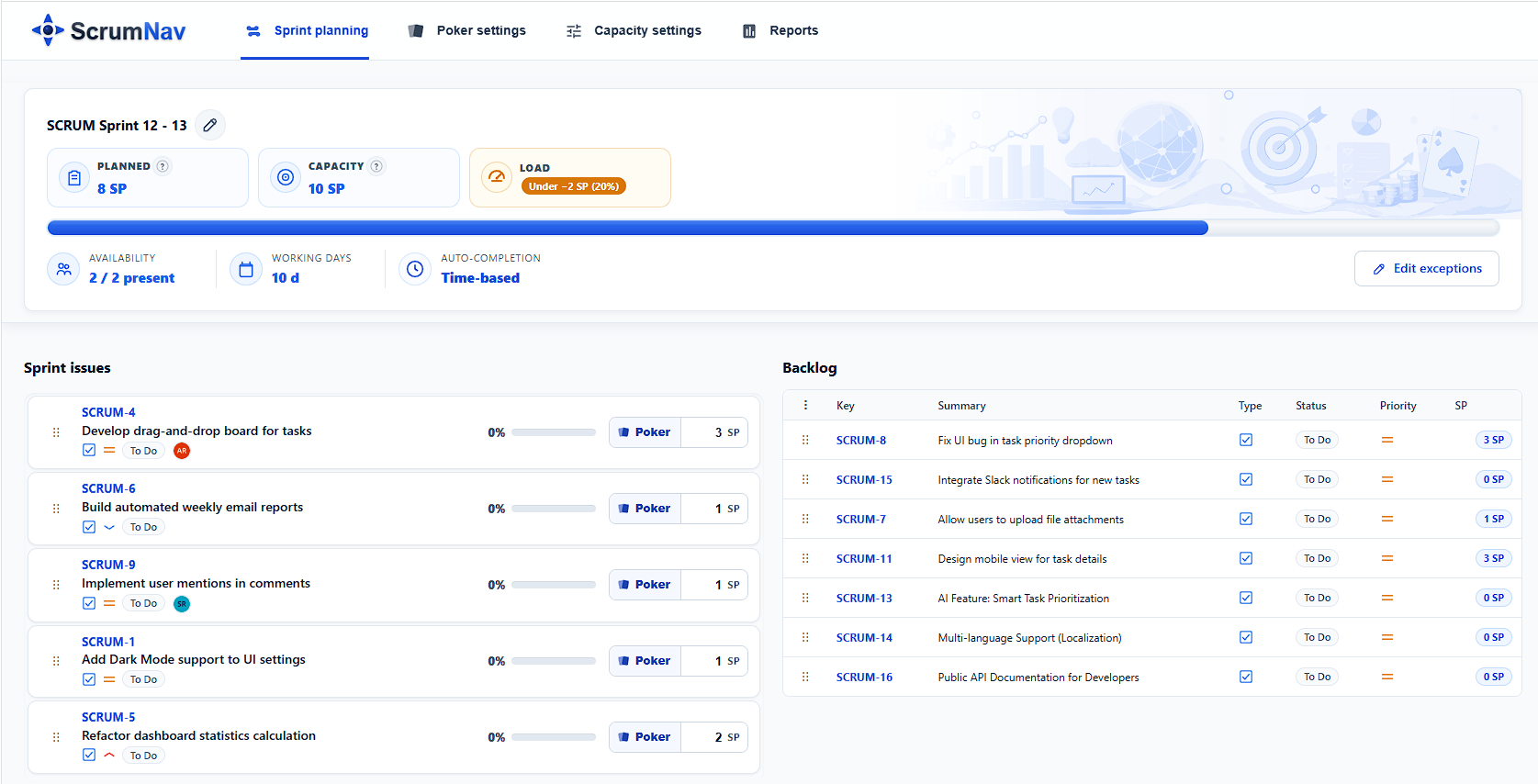
ScrumNav helps teams apply buffer decisions directly inside Jira planning workflow by showing planned load against configured capacity in one place.
- Capacity and planned load visibility without external spreadsheets
- Faster scope trim discussions before Sprint start
- Clear over/under signals while building forecast
- Carry-over-aware planning conversations in one view
Learn more at Sprint Planning in Jira with ScrumNav.
When to use a larger buffer
Use a larger buffer when forecast volatility is structurally high.
| Condition | Typical impact | Suggested range |
|---|---|---|
| Frequent urgent support interrupts | Unplanned work displaces planned feature flow | 12%–15% |
| High carry-over variability | Remaining load harder to forecast accurately | 12%–15% |
| Multiple external dependencies | Blocking risk increases despite good refinement | 10%–15% |
| New domain or new team composition | Estimation and delivery uncertainty are higher | 10%–15% |
When to use a smaller buffer
A smaller buffer can work when the team has stable execution signals and low interruption pressure.
- high refinement consistency and low surprise rate
- predictable support commitments
- low and stable carry-over trend
- forecast error close to zero over several Sprints
Even with stable execution, avoid treating 100% of calculated capacity as an automatic planning target. If the capacity model already includes a conservative efficiency factor or contingency, the team may need a smaller additional buffer.
How to calibrate your percentage
Review planning percentage every 3–5 Sprints using a simple evidence loop.
Track:
- planned points vs completed points
- carry-over amount and trend
- support/urgent defect interruption load
- scope trim frequency during Sprint execution
- forecast error direction and size
Increase buffer if misses are frequent or carry-over is rising. Reduce buffer gradually only when accuracy stays stable and interruption pressure remains low.
Common mistakes
1) Planning every Sprint to 100%
Planning every Sprint to the full calculated capacity removes the margin for normal uncertainty, unless that margin has already been included in the capacity model.
2) Treating velocity as a fixed target
Velocity is historical evidence, not a mandatory target for a future Sprint with different availability, risks, and dependencies.
3) Skipping adjusted capacity math
Planning from nominal capacity ignores known non-delivery constraints and inflates initial scope.
4) Ignoring carry-over remaining load
Carry-over consumes forecast budget first. Ignoring it leads to systematic over-commitment.
5) Re-estimating stories only to show progress
Rewriting original points breaks comparability. Track remaining load separately instead.
6) Using one percentage forever
Buffer needs calibration as team conditions, support burden, and dependency landscape change.
7) Double-counting reductions
Availability adjustment and buffer are distinct. Mixing them can under-forecast unnecessarily.
8) Hiding buffer as implicit overtime
If delivery relies on recurring overtime, the buffer is too small or scope selection is too large.
9) Not linking scope changes to Sprint Goal
Trimming must preserve Sprint Goal coherence. Random cuts weaken value delivery.
10) No retrospective feedback into planning percentage
Without periodic review, teams repeat forecasting errors instead of improving planning reliability.
Checklist
Capacity
- Adjusted capacity is calculated and visible to the team.
- Known availability constraints are included before forecasting.
Sprint buffer
- Planning percentage is explicitly chosen (5%, 10%, or 15%).
- Planning target is calculated from adjusted capacity.
Carry-over
- Carry-over remaining load is counted before adding new scope.
- Original story points are not changed only to represent progress.
Sprint forecast
- Planned load is at or below planning target before Start sprint.
- Sprint Goal remains coherent after any trim/split decisions.
Frequently asked questions
- How much buffer should you leave in a Jira Sprint?
- A practical starting point is 5–15% of adjusted Sprint capacity. Ten percent is a useful default for many teams, but the right amount depends on uncertainty, support load, dependencies, refinement quality, carry-over, and recent delivery.
- How much buffer should you leave in a Scrum Sprint?
- Scrum does not prescribe a percentage. Many teams benefit from starting with a 5–15% buffer and adjusting it using actual Sprint data.
- Is a 10% Sprint buffer enough?
- It may be enough for a stable team with occasional interruptions. Teams with frequent production incidents, new technology, unclear issues, external dependencies, or high carry-over may need 15% or more.
- Should you plan a Sprint to 80% capacity?
- Planning to 80% may be appropriate for a team facing substantial uncertainty or frequent interruptions. Do not use 80% automatically. First adjust capacity for known commitments, then choose a buffer based on evidence.
- Is Sprint buffer part of Scrum?
- Scrum does not require a separate buffer or prescribe a planning percentage. Buffer is an optional planning technique teams can use to create a more realistic forecast.
- Should Sprint buffer be measured in story points or percentage?
- Define the buffer as a percentage of adjusted capacity, then convert it into the team’s planning unit. For example, a 10% buffer on a 40-point capacity produces a planning target of 36 points.
- Does buffer include carry-over?
- No. Carry-over remaining load is planned work and counts toward the planning target. Buffer is the unallocated capacity left after carry-over and new work have been included.
- Should meetings be included in the Sprint buffer?
- Known meetings should normally be included in the capacity calculation or efficiency factor. Buffer should cover uncertainty, not predictable calendar commitments.
- Should production support be included in the buffer?
- Known or recurring support responsibility should be included in capacity planning. Buffer can help absorb unpredictable variation above the expected support load.
- Should you create a buffer story in Jira?
- Usually not. A fake buffer story can distort backlog and Sprint reporting. It is normally clearer to leave part of the calculated capacity unallocated.
- How do you know if the Sprint buffer is too small?
- Warning signs include frequent mid-Sprint scope cuts, rising carry-over, rushed testing, consistently negative forecast error, hidden overtime, and Sprint Goals regularly being placed at risk.
- How do you know if the Sprint buffer is too large?
- The buffer may be larger than necessary when it repeatedly remains unused, the initial forecast is consistently completed, carry-over is low, Sprint Goals are consistently achieved, and additional ready work is regularly pulled into the Sprint.
- Does Jira calculate Sprint buffer automatically?
- Jira can show issue estimates and Sprint totals. Some Jira configurations also provide target-range or capacity information. Jira does not automatically determine the correct uncertainty buffer for every team.
- Can ScrumNav calculate the planning target?
- ScrumNav shows planned Sprint load against configured capacity so teams can see whether scope is under, near, or over the current planning limit. The team still decides the appropriate capacity and buffer based on its working conditions.
Sources and methodology
Scrum does not prescribe a Sprint buffer percentage. The 5–15% range in this guide is a practical starting convention, informed by the commonly recommended 10% margin and intended to be calibrated using each team’s own delivery history.
Jira’s available capacity and target-range features vary by configuration and subscription. Check Atlassian’s current Jira Cloud documentation for Sprint commitment insight and capacity planning in Plans.
Plan Sprint scope against configured capacity in real time with ScrumNav.